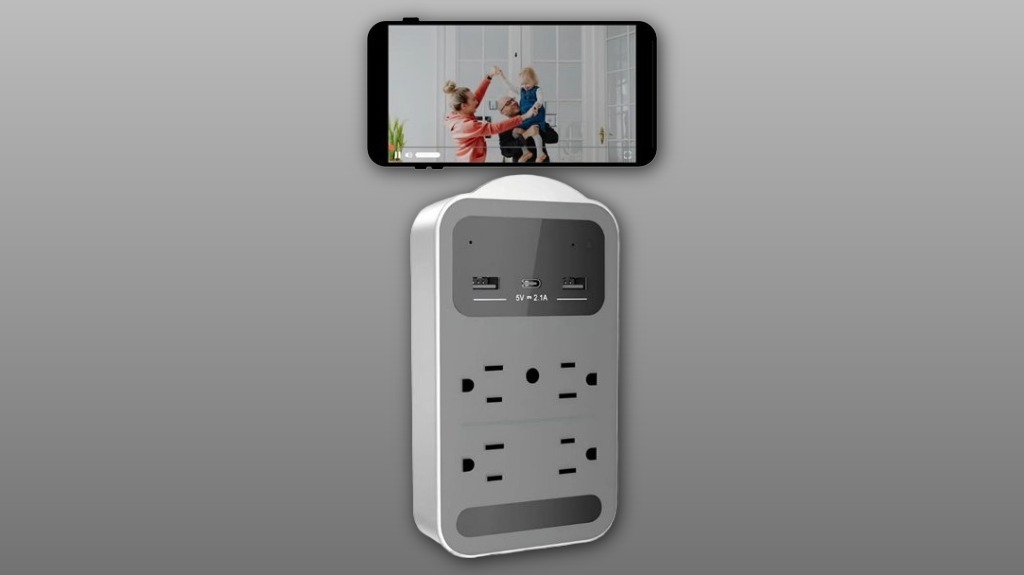

You’ll get true 4K video with a 160° field of view in a stealthy USB‑charger body that records continuous 10‑minute clips to an SD card and captures ambient audio. Setup requires the companion app and a 2.4 GHz Wi‑Fi connection; format the card in‑camera and use motion zones to limit alerts. Image sharpness is best in midrange, with some edge softening and balanced low‑light noise reduction. Keep backups and you’ll learn more about performance, setup, and comparisons.
Some Key Takeaways
- Records true 4K video in continuous 10‑minute clips with built‑in audio for clear indoor monitoring and evidence-grade detail.
- 160° wide‑angle lens covers broad areas with minimal fisheye and some edge softening, reducing need for multiple cameras.
- Plugs into power via stealth charger form factor; requires 2.4 GHz Wi‑Fi and companion app for setup and live view.
- Local SD storage (up to 128 GB) supports looped recording and in‑camera formatting; oldest clips overwrite automatically.
- Motion zones, dynamic range handling, and surge protection improve alert relevance, low‑light performance, and file reliability.
What the 160° Wide Angle 4K HD Charger Camera (Cam GR) Actually Records
Typically, the Cam GR records continuous 10-minute clips at true 4K resolution with a 160° wide-angle field of view, capturing broad indoor scenes like rooms or pet areas in high detail. You’ll get wide coverage that reduces blind spots, ideal for monitoring shared spaces or pets. The camera stores looped clips to an SD card, overwriting oldest files when full, and uses surge protection to protect recordings. You can define motion zones to focus alerts and conserve storage. Built-in audio capture records ambient sound alongside video for context. You’ll rely on clear, consistent footage for daily monitoring and reassurance. It’s designed for family pet owners and integrates with other devices sold on the site for a complete two-way pet camera setup.
How Setup, Connectivity, and the App Work (Step‑by‑Step)
Now that you know what the Cam GR records, setting it up and connecting it to the app is straightforward and can be completed in a few focused steps. Plug the charger into power, remove protective films, then open the companion app for app onboarding. Create or sign into your account, follow network prompts, and connect the Cam GR to your 2.4 GHz Wi‑Fi. If connection fails, close and reopen the app; try power cycling the unit by unplugging briefly and replugging. For persistent issues, press and hold Reset for 2 seconds and restart onboarding. Insert an SD card for local recording and confirm live view. Keep an eye on your pet with a purpose-built home pet webcam to ensure both safety and peace of mind.
Video Quality, Field of View, and Low‑Light Performance Tested
Although the Cam GR's headline spec is true 4K, you'll notice the most practical advantages come from its 160° wide field of view and how the sensor manages contrast and low light. You get broad coverage with minimal stitching or fisheye distortion, so a single unit often replaces two cameras. Detail at midrange is sharp; edges soften as expected with such a wide lens. Dynamic range handles bright windows and darker interiors reasonably well, preserving shadow detail without clipping highlights. Motion responsiveness stays snappy for typical home use, and low‑light noise reduction balances clarity and grain so footage remains usable.
Storage, Recording Behavior, and SD Card Best Practices
Having covered how the Cam GR captures wide scenes and handles low light, let’s look at how it stores and manages that footage. You’ll use an SD card (up to 128 GB) for local storage; the camera writes ten-minute clips and labels them sequentially for simple file management. When the card fills, continuous overwriting removes the oldest clips automatically, so you won’t run out of space. The unit includes surge multi-protection to reduce corruption risk, but you should format new cards in-camera and replace cards periodically. Regularly back up important clips to avoid accidental loss and keep shared access organized for your group. Prepare your pet for emergencies by keeping an evacuation kit ready that includes copies of critical footage and pet records.
Who Should Buy This Charger Camera and How It Compares to Alternatives
If you want a discreet indoor camera that doubles as a usable USB charger and records true 4K with a wide 160° field of view, this unit is a strong fit—especially for home, office, or pet monitoring where wired power and local SD storage (up to 128 GB) are acceptable. You should buy it if you value high-resolution wide coverage, continuous local recording, and simple plug-and-play setup. Pet owners and small business managers will appreciate the stealthy form factor and overwrite protection. Alternatives with cloud-only storage, battery operation, or 5 GHz Wi-Fi suit different priorities like mobility or faster networks. Our product range focuses on pet health monitoring cameras for family pet owners, offering solutions designed to help you keep your pet healthy with smart home monitoring.
Some Questions Answered
Does the Camera Support Two-Way Audio or Microphone Mute?
Yes — the device supports Two way audio, letting you speak and listen remotely through the app. You’ll also find a Microphone mute option so you can silence audio when needed for privacy. You’ll control both features from the companion app during live view; if you don’t see them, reopen the app or reset the camera and reconnect. These controls help you feel included and secure while managing audio access.
Can Multiple Users Access the Live Feed Simultaneously?
Yes — you can have concurrent streams: multiple users can access the live feed simultaneously via shared access in the companion app. You’ll add users by sharing account credentials or using the app’s sharing feature, granting view permissions without disrupting others. Connection relies on 2.4 GHz WiFi, so make sure stable network bandwidth. You’ll feel included and secure knowing family or trusted coworkers can watch live together when needed.
Is There a Subscription Required for Cloud Storage or Advanced Features?
No subscription’s required for local backup — you can record to an SD card (up to 128 GB) and overwrite older files for continuous storage. If you want cloud options, check the vendor’s pricing tiers; some advanced features or remote history may sit behind paid plans. You’ll still get basic live viewing and recording without fees, and customer support plus replacement policies help you feel supported if issues arise.
What Power Adapter Specs or Cable Length Are Included?
The package includes a USB C adapter and a Long cable that lets you power the device without extra parts. You’ll get the USB C adapter rated for standard 5V/2A charging (suitable for steady video), and a Long cable roughly 6 feet (about 1.8 meters) so you can place the camera where you need it. If you want a different length or higher amperage, reach out and they’ll help.
Is the Device Compatible With Smart Assistants (Alexa/Google Home)?
No — it isn’t compatible with Alexa or Google Home for direct voice control or smart routines. You’ll still get live view and alerts through the companion app, but you can’t add the camera into existing voice-driven automations. If you want voice-enabled routines, you’ll need a different model or bridge that specifically lists Alexa/Google Home integration. You’re included though: the seller offers returns and support if this doesn’t meet your setup.