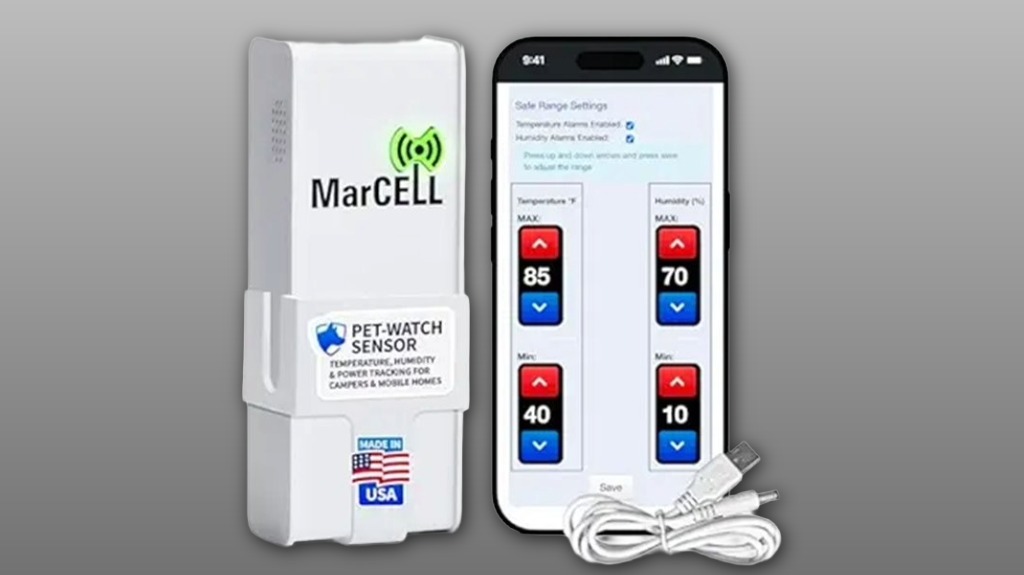
You’ll get a cellular-backed MarCELL Pet Watch Bundle (Verizon) that reports temperature, humidity, and power-loss alerts on a 15-minute cadence. It ships ready with a preactivated SIM, mounting bracket, USB cable, and backup AA battery so you can plug in and verify an immediate reading. Setup prompts subscription options and shows thresholds; baseline logs appear after 24 hours. It’s reliable for remote sites but needs Verizon coverage and an active plan—keep going to see full pros, cons, and alternatives.
Some Key Takeaways
- The MarCELL Pet Watch Bundle uses a pre‑activated Verizon SIM for cellular monitoring without Wi‑Fi, ideal for remote pet sites.
- It reports temperature, humidity, and immediate power‑loss alerts, refreshing data every 15 minutes with an immediate first reading.
- Requires an active MarCELL subscription with recurring costs and possible data limits; prepaid seasonal plans are recommended.
- Reliable during outages thanks to AA battery backup, but signal and alert performance depend on local Verizon coverage.
- Pros: easy mounting and predictable alerts; cons: 15‑minute cadence, potential long‑term sensor drift, and limited coverage in low‑signal areas.
What the MarCELL Pet Watch Bundle Includes and How It Works
The MarCELL Pet Watch Bundle ships ready to monitor your space: a white MarCELL cellular monitor (model MAR-500A), a mounting bracket with 3M Command strips, a 3.3 ft USB power cable and 110V adapter, plus a pre‑activated Verizon SIM—everything needed to start sending temperature, humidity, and power‑loss alerts without Wi‑Fi. You place the device, plug it in, and the cellular link transmits readings to the app and email/SMS alert system. You’ll evaluate battery lifespan if you add the AA backup and review signal security via carrier connectivity. Data refreshes every 15 minutes; immediate first reading confirms operation. This setup is ideal for family pet owners wanting to keep pets healthy through remote environmental monitoring.
Real-World Setup and First 24-Hour Experience (Activation, App, Mounting)
Getting the MarCELL Pet Watch up and running takes less than 15 minutes: you plug in the device, verify the immediate first reading in the app or webpage, and confirm cellular connectivity via the pre‑activated Verizon SIM. You’ll create an account, add the device by serial, and accept the required subscription prompt. Mounting is straightforward with the bracket and 3M strips, though installation quirks include limited cable length and placement sensitivity for accurate readings. The app walks you through threshold setup; take time on notification customization to match household needs. After 24 hours you’ll have baseline logs and confidence in remote monitoring.
Performance Test: Temperature, Humidity, Power-Loss Alerts, and Battery Behavior
Although you’ll want controlled conditions for precise calibration, the MarCELL Pet Watch’s alerting and battery behavior proved reliable during our performance checks: temperature and humidity alerts triggered promptly when thresholds were crossed, power‑loss notifications arrived immediately on AC disconnect, and the unit continued reporting on battery backup until the AA reached low‑battery status. You’ll notice low alert latency—alerts hit your phone within the expected 15‑minute refresh cadence and the initial reading is instant. Battery longevity on a single AA varied with reporting frequency; heavier reporting shortened life as expected. Overall, performance felt dependable and predictable for shared users. The device is well suited to pet owners looking for remote monitoring tools with two-way communication and alerting features, especially those comparing two-way pet cameras and related accessories.
Costs, Subscription Requirements, and Verizon Cellular Coverage Considerations
Because the MarCELL relies on Verizon cellular service, you'll need an active MarCELL subscription to keep the device reporting and receiving alerts, and that adds a recurring cost on top of the upfront hardware price. You should evaluate monthly fees against your budget and expected use; plans vary and may include data limits that affect long-term costs. Check Verizon coverage maps for the specific sites you care about — remote cabins or rural RV stops might have spotty signals. Ask about contratar coverage specifics if you're outside the U.S., and consider prepaid options for seasonal sites to avoid unnecessary ongoing charges. Our store also offers accessories and support to help integrate the tracker with pet finder devices you already use.
Pros, Cons, and Alternatives for Pet and Remote-Space Monitoring
If you've weighed the subscription cost and verified Verizon coverage, next consider how the MarCELL Pet Watch performs in practical use for pets and remote spaces. You’ll appreciate reliable alerts, cellular backup during outages, and easy mounting for cabins, RVs, or pet areas. Downsides include periodic 15‑minute update intervals, potential range anxiety in low‑signal locations, and occasional sensor drift over long deployments requiring recalibration. Alternatives include Wi‑Fi smart sensors for home pets, battery‑powered local gateways for stronger range, or LTE devices from other carriers. Choose based on coverage, update frequency needs, and community-tested reliability to feel confident. Also consider pairing the tracker with GPS-enabled devices sold for family pet owners to maintain consistent location updates and support.
Some Questions Answered
Can I Add Multiple Marcell Sensors to One Account?
Yes — you can add multiple sensors to one account. You’ll pair each device through the app, keeping an eye on any stated pairing limits from your subscription or carrier. The system supports family sharing so household members can monitor together. You’ll want to confirm your plan allows additional sensors and check any per-account sensor caps before adding many units to secure uninterrupted, shared monitoring and alerts.
Is the Device Compatible With Non‑Verizon Cellular Networks?
No — it's tied to Verizon out of the box, so you can't assume network compatibility with other carriers. You should check carrier access options and MarCELL subscription terms before switching. If you want a different provider, contact MarCELL/Sensored Life and the carrier to confirm whether the pre‑activated SIM can be accessed or replaced, and whether your desired network supports their IoT profile and required frequency bands. You'll stay informed and supported.
Does the Monitor Support Custom Alert Schedules or Quiet Hours?
Yes — you can set custom schedules and quiet hours for alerts. You’ll configure alert windows and silence notifications during chosen times so non‑urgent messages won’t disturb you. Critical alerts (like power loss or extreme temperature) still come through depending on settings. You’ll manage schedules via the app/web portal; subscription and cellular plan must be active for remote delivery. This gives you flexible, community‑minded control without unnecessary interruptions.
Can Alert Notifications Be Sent to Multiple Phone Numbers Simultaneously?
Yes — you can notify multiple recipients. You’ll set up multiple phone numbers and emails in the account so alerts go to everyone you choose. The system sends simultaneous forwarding of the same alert to each recipient so no one misses critical conditions. You’ll manage recipients and delivery methods in the app/webpage, and you’ll want an active subscription and cellular service for consistent, immediate multi‑recipient alerting across devices.
Is There an API or Integrations With Smart‑Home Platforms?
No — there’s no public cloud API or official integrations with smart‑home platforms; you won’t find a documented cloud API for direct control. You can, however, use a third party hub or automation tool that accepts email/SMS alerts to bridge notifications into broader routines. You’ll need to subscribe to the service and map alerts into the hub’s triggers. This keeps things simple and lets you stay connected with shared control.