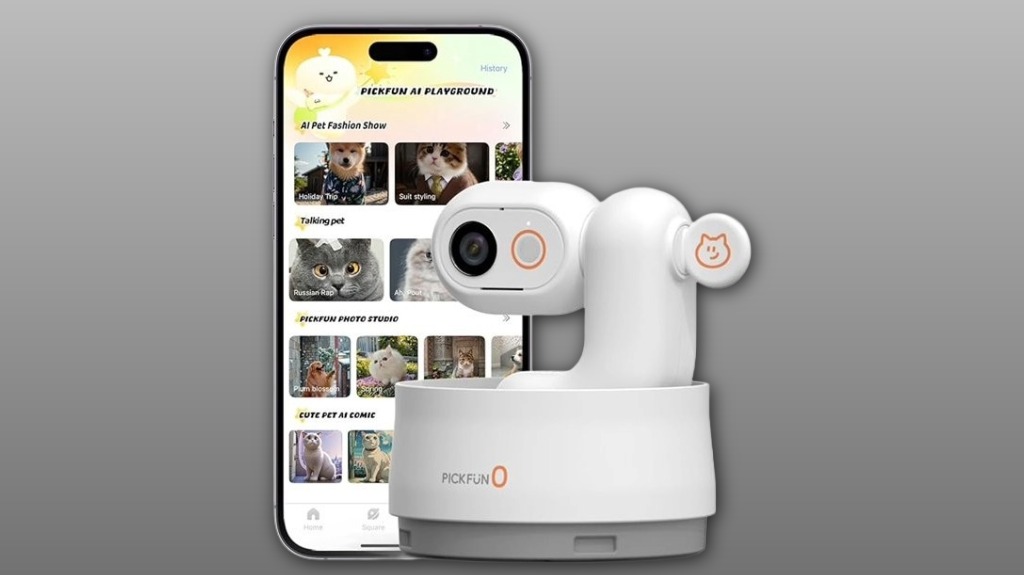

You’ll get sharp 2K live video with true 360° pan‑tilt and low‑latency auto‑tracking that keeps your pet centered through zoomies and naps. The AI reliably tags dogs vs. cats and flags eating, sleeping, and play, then auto‑records and trims highlights you can one‑tap share. Two‑way talk, night vision with fill lights, and a Privacy Sleep Mode make daily use simple and respectful. Keep going to see practical performance notes and who it’s best for.
Some Key Takeaways
- 5MP 2K camera with true 360° pan-tilt delivers sharp, low-latency video and full-room coverage without blind spots.
- Reliable AI auto-tracking keeps pets centered in real time, though fast zoomies or quiet chewing can occasionally be missed.
- AI labels species (dog vs. cat), flags eating/sleeping/playing, and offers basic breed attempts and bark/meow analysis.
- Day-to-day features include two-way talk, infrared night vision with gentle fill lights, Privacy Sleep Mode, and visible recording indicators.
- Automatic highlight editing, one-tap sharing, and compatibility with multi-user access plus A3 pet robot and health integrations.
How the P0's 2K 360° Camera and Auto-Tracking Perform in Real Use
When you point the P0 at your living room, its 5MP 2K lens and true 360° pan-tilt quickly deliver sharp, low-latency live video so you can see fine details without lag. You’ll notice reliable auto-tracking that keeps your pet centered, with latency performance good enough for real-time reactions. Battery life holds up during active days, though continuous tracking uses more power. Mounting options are flexible — tabletop or wall — so you’ll fit it into your home and routine. Firmware updates have improved tracking and fixed jitter; you’ll want to install them to keep performance tight and consistent. The P0 is part of a growing lineup of devices designed for pet owners who want to keep an eye on their animals from anywhere.
What the P0's AI Pet Detection Actually Notices (Dogs vs. Cats, Eating, Sleeping, Playing)
Although the P0's AI isn't perfect, it reliably distinguishes dogs from cats and flags the big behaviors you'll care about—eating, sleeping, and playing—so you get useful, low-noise alerts and summaries rather than constant false alarms. You’ll appreciate clear labels in the app: dog vs. cat, sleep sessions, meal times, and play bouts. It even attempts breed recognition and uses vocal analysis to weigh barks versus meows when classifying events. Expect occasional misses—fast zoomies or quiet chewing can blur decisions—but overall the AI gives you consistent, community-minded feedback that helps you keep tabs without feeling overwhelmed. Our smart home monitoring cameras also integrate with other pet health tools for a more complete picture of your pet's wellbeing pet health monitoring.
Day-to-Day Features That Matter: Audio, Night Vision, Fill Lights, and Privacy Sleep Mode
The P0’s audio, night-vision and privacy features matter as much as its behavior detection because they shape how you actually interact with and trust the camera day-to-day. You’ll appreciate clear two-way talk and thoughtful microphone placement that reduces echo and captures subtle barks or purrs so you can soothe or scold remotely. Infrared night vision plus built-in fill lights keep colors and details visible without startling your pet. Privacy Sleep Mode fully disables sensors and recording; visible privacy indicators reassure everyone in the home. These practical touches make the P0 feel reliable, respectful, and easy to include in daily life. We also offer a range of pet camera accessories designed for happy families to enhance placement, mounting, and overall usability.
Auto-Recording, Clip Editing, and One‑Tap Share : Can You Create Viral Pet Videos Easily?
Dive straight in: the P0 makes turning everyday pet moments into shareable clips fast and painless. You get automatic recording and AI edits that spot cute actions and trim highlights, so you’re not digging through hours of footage. The one-tap share pushes clips in viral formats and nudges caption trends, helping your posts fit platform norms. You’ll appreciate soundtrack selection suggestions and tasteful filter presets that give a cohesive feed look. It’s practical: saves you time, boosts engagement, and helps you join a community of pet creators. If you want simple, polished videos, the P0 delivers. It also integrates well with two-way pet cameras designed for family pet owners, making monitoring and content creation seamless.
Who Should Buy the P0: Family, Apartment, Multi‑User Needs, and Compatibility With A3
Who needs the P0? You do if your family lifestyles demand reliable pet care and connection. In homes with kids or older relatives it gives peace of mind; in apartment layouts its 360° coverage and compact design avoid blind spots. If you share responsibilities, multi user sharing lets everyone check in and get behavior summaries without chaos. You’ll appreciate a3 compatibility if you already own that pet robot — the two cooperate for automated feeding and play. Overall, choose the P0 when you want inclusive, easy-to-manage monitoring that fits shared living and keeps your pets—and people—closer. It also pairs well with recommended pet packing lists to help ensure stress-free travel with your family.
Some Questions Answered
Does the P0 Support Local (SD) Storage Instead of Cloud-Only?
Yes — you can use local storage with an SD card. You’ll insert an sd card to save recordings locally instead of relying on cloud-only plans, giving you direct control over footage and privacy. It’s convenient for quick access, lowers subscription dependence, and supports the camera’s automatic recording and one-tap video exports. You’ll still get app notifications and AI summaries while keeping your pet’s videos stored where you choose.
Can I Schedule Recording or Motion Detection Zones on the P0?
Yes — you can set scheduled recording and define detection zones. You’ll schedule recording windows so the camera only captures what matters, and you’ll draw detection zones to ignore busy areas or focus on favorite spots. That reduces false alerts and saves storage. You’ll also get daily summaries tied to those settings, and sharing/sub-account controls let your household stay in sync with the camera’s schedule and zones.
Is the P0 Compatible With Smart Home Assistants (Alexa/Google Home)?
Yes — you can use voice commands and include the P0 in smart routines with Alexa and Google Home. You’ll link the main account, enable the camera skill/action, then control live view, two-way audio, and basic automations hands-free. It won’t replace advanced hub features, but it fits familiar smart-home flows so you’ll feel connected and in control. Sharing access with family members is straightforward for communal care.
What Are the Warranty Length and Customer Support Options?
You get a one-year warranty duration for defects, and extended plans may be available for purchase. For support channels, you can contact email support, in-app chat, phone hotline, and an online help center with FAQs and troubleshooting. You’ll find community forums and multi-account setup guides too. If you need faster help, phone or in-app chat is best; email handles documentation and warranty claims so you won’t feel left alone.
Does the Camera Require Constant Wi‑Fi Bandwidth or a Specific Router Type?
No, it doesn't need constant maxed-out bandwidth, but you should meet recommended bandwidth limits for smooth 2K streaming and AI features. You won't need a special router, though router compatibility with 2.4/5 GHz bands and stable upload speeds matters. If multiple users or devices share your network, upgrade bandwidth or use QoS on a compatible router to prevent lag. You’ll feel more confident with a stable, modern setup.