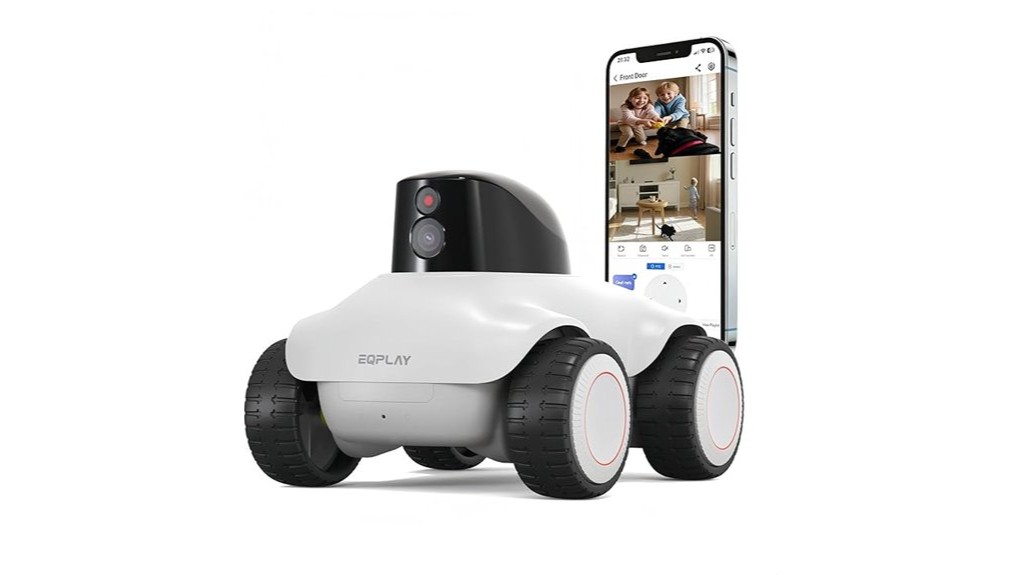

You’ll find a practical, pet‑friendly home companion that patrols, talks, and entertains without needing constant babysitting. It streams crisp 2K video, supports two‑way voice chats, and navigates carpets and thresholds reliably while returning to charge when the battery’s low. Night vision keeps faces and pets recognizable, and pet modes engage gently. Use strong passwords and updates for privacy. It’s a solid choice for families who want remote check‑ins and play — keep going to learn setup tips and limits.
Some Key Takeaways
- Reliable 2K camera, full‑color night vision, and two‑way talk make remote check‑ins and family calls clear and natural.
- Four‑wheel patrol with obstacle negotiation suits homes with carpets, thresholds, and tight spaces for routine monitoring.
- Pet modes and gentle engagement safely entertain pets without causing stress, complementing pet health accessories.
- Dual‑band Wi‑Fi (including Wi‑Fi 6) and cloud/local storage choices offer flexibility but may need separate SSIDs for older routers.
- Battery supports regular patrols and auto‑return to charge, but not continuous overnight surveillance without recharging.
Quick Verdict: Is This Family Companion Robot Worth It?
Bottom line: this family companion robot delivers solid value if you want a mobile, interactive home monitor and pet entertainer, though it’s not flawless. You’ll appreciate how it moves through rooms, checks on loved ones, and amuses pets, creating a sense of togetherness. Battery life holds up for regular patrols but won’t replace overnight surveillance without recharges. Its voice assistant responds naturally for quick commands and calls, though you’ll want to test compatibility with your devices. If you crave a connected, comforting presence that joins your household routines, this robot fits—practical, warm, and worth considering. It pairs well with pet health monitoring products that keep pets safe and monitored at home.
What the Robot Does: Core Features and How They Work
If the quick verdict convinced you this robot could fit into your home, here’s what it actually does and how those features work together. You’ll use voice commands or the app to call, guide, and converse with family members; the built‑in mic and speaker make two‑way chats natural. It patrols on four‑wheel drive, sending 2K video and motion alerts over Wi‑Fi; footage saves locally or to cloud. Pet modes entertain and comfort loved ones. Practical touches include dual‑band connectivity and clear battery management so it returns to charge when low. Updates promise smarter detection and richer shared moments. For pet owners who want to stay connected from anywhere, a two‑way pet camera can provide constant visual contact and interaction with your animals, making it easier to monitor and comfort them with remote audio and video two‑way pet cameras.
Real-World Tests: Mobility, Camera, Night Vision, and Pet Interactions
When you actually let the robot loose around your home, its mobility, camera, night vision and pet modes reveal how well the concept holds up in daily use: the four-wheel drive handles carpets, thresholds and tight turns reliably, the 2K camera delivers sharp daytime detail, and the full-color night vision keeps faces and pet features recognisable in low light. You’ll appreciate steady wheel traction and confident obstacle negotiation during patrols; the camera framing feels natural for family check-ins. Night images retain warmth without relying on crude thermal imaging. Pet modes engage gently to avoid pet stress while encouraging interaction and inclusion. For families with pets, pairing the robot with personalized pet ID tags can help ensure quick identification if a curious animal slips out during a patrol.
Limits and Compatibility: Connectivity, Device Support, and Privacy Concerns
Although the robot offers robust connectivity options, you should know its limits before relying on it as the backbone of your home monitoring, because dual-band Wi‑Fi and Wi‑Fi 6 support bring both benefits and compatibility pitfalls. You’ll enjoy faster, less congested connections, but older devices may struggle with band steering; separate SSIDs can help. Check network compatibility with your router and smart home hubs before buying. Privacy controls are straightforward in the app, letting you manage recordings and access, yet cloud options add exposure. You’ll want strong passwords, firmware updates, and clear family rules so everyone feels secure and included. Also consider pet-friendly accessories like comfortable steps to help pets access the car safely and reduce stress during outings.
Who Should Buy It and Practical Setup Tips (Storage, App, and Upgrades)
Because you want dependable home monitoring and a friendly companion in one device, this robot fits households that value mobility, easy remote interaction, and pet engagement — especially families with kids, seniors, or pet owners who’ll use two-way talk, laser play, and scheduled patrols. You should buy it if you need remote check-ins, active pet engagement, or a mobile monitor that reduces blind spots. For setup checklist, start with dual-band Wi‑Fi pairing (try separate bands if older gear misbehaves), insert a T card or enable cloud service, and install the app. Follow the upgrade roadmap for new AI and pet-follow features. We also recommend checking compatible pet camera accessories to expand functionality and tailor the robot to family needs.
Some Questions Answered
Can the Robot Be Scheduled for Automatic Daily Patrols?
Yes — you can schedule automatic daily patrols. You’ll set patrol times in the app, and the robot will follow routes with motion tracking to reduce blind spots. You can also enable voice activation for quick manual overrides or to start patrols on demand. You’ll feel secure knowing it checks the house regularly, alerts you on motion, and keeps loved ones connected. It’s designed to fit into your routine and community.
How Loud Is the Robot During Normal Operation?
You’ll find the robot reasonably quiet during normal operation — motor noise is low and unobtrusive, comparable to a softly humming appliance. Its voice volume is adjustable in the app, so you can set spoken alerts and two-way calls to suit rooms and ears. You won’t feel overwhelmed; it’s designed to blend into home life, letting you and your family relax while still staying connected and heard.
Is There an Emergency SOS Feature for Family Members?
Yes — you can use a panic button to call for help instantly. You’ll tap the one-touch call, and the robot connects to your phone for two-way voice while sending location tracking to designated contacts or emergency services. You’ll feel reassured knowing it supports quick alerts, real-time position info, and continuous monitoring. It’s designed so your household feels supported, included, and safer during urgent moments.
Can Multiple Users Connect to the Robot Simultaneously?
Yes — the robot supports multi user access so family members can connect, but it enforces account limits to prevent overload. You’ll see privacy settings to control who views feeds and who can move the robot. Simultaneous streaming is allowed for basic viewing, yet interactive control may be restricted to one user at a time. You’ll feel included while preserving security and clear ownership of control.
What Is the Battery Life During Continuous Video Streaming?
You’ll get about 4–6 hours of continuous video streaming under normal conditions; heavy use and higher brightness settings can shorten that. Expect gradual battery degradation over many charge cycles, so streaming limits will slowly drop over months. You’ll want to plan charging routines or dock use for overnight patrols. We’ve seen this behavior before, so you’re not alone — small adjustments keep the robot reliable and included in daily life.