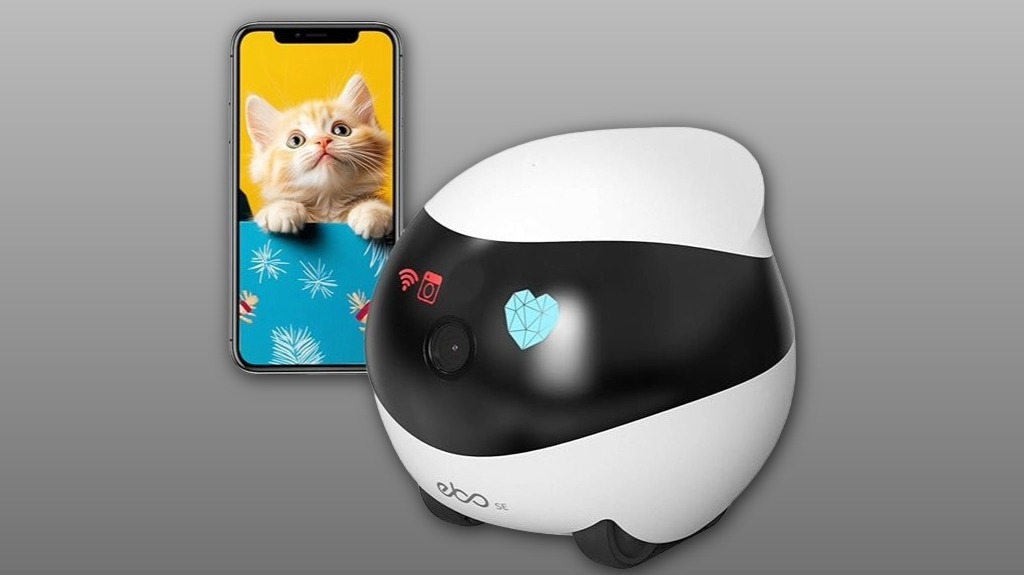

You’ll find the Enabot EBO SE is a compact, wheeled 1080p familybot that’s built for at‑home pet and family monitoring. It lets you steer or set patrols via the ROLA app, offers two‑way talk, reliable night vision, and convenient auto‑docking, though battery life is modest and Wi‑Fi can be finicky. Local storage and privacy-friendly design appeal if you avoid cloud subscriptions. Keep going and you’ll get hands‑on setup tips, performance notes, and a clear buy recommendation.
Some Key Takeaways
- Compact rolling home camera with 360° pan and wheeled mobility for broader coverage than stationary pet cams.
- Offers 1080p daytime video, infrared night vision, and two-way talk for clear pet and family monitoring.
- Manual steering via the ROLA app plus autonomous patrols reduce blind spots and reach under furniture.
- Modest battery life with auto-dock helps continuous monitoring but limits patrol frequency between charges.
- Local storage available and optional cloud subscriptions require weighing convenience against privacy and cost.
What the Enabot EBO SE Familybot Is and Who It’s For
Think of the Enabot EBO SE Familybot as a compact, rolling indoor camera designed to keep tabs on your home and pets while you’re away. You’ll appreciate its purposeful mobility and app-led control that let you steer patrols, reduce blind spots, and check corners under furniture. It’s meant for households that want connected reassurance: quick camera petting moments, two-way chats, and family alerts when motion’s detected. You’ll value clear daytime imagery and night vision for quiet hours. If you want a social, mobile monitor that fits into a caring household, this device balances utility with approachable tech. The system is especially useful for family pet owners who want to keep their pet healthy through continuous home monitoring.
Key Specs and Features That Matter for Home and Pet Monitoring
Now let’s look at the specs that determine how well the EBO SE performs as a home and pet monitor. You’ll weigh battery life first — long runtime with auto-dock matters for continuous monitoring. Build quality affects reliability and safe navigation around pets and furniture. Prioritize clear local storage and note privacy concerns: where footage is stored, who can access it, and encryption standards. App controls should be intuitive so you feel connected to your home and family. Finally, compare subscription options for cloud storage and advanced features; choose the plan that balances cost, privacy, and the features you actually need. Also consider the camera’s two-way audio and remote interaction for staying involved with your pet from anywhere, especially when using two-way pet cameras.
Real-World Performance: Mobility, Video, Night Vision, and Two-Way Talk
Although compact, the EBO SE moves confidently around a home, and you'll notice its 360° camera on wheels closes coverage gaps that stationary cams leave open. You steer manually via the ROLA app or let it patrol; its low profile slips under furniture and clears blind spots. Daytime 1080p footage is sharp; infrared night vision yields usable monochrome detail in darkness. Two-way talk is responsive for quick check-ins with family or pets. Battery life dictates patrol frequency, and automatic docking eases range anxiety. Privacy settings are straightforward—limit access, disable audio, or schedule offline periods to suit your household. For pet owners who travel with animals in cars, consider protecting windows using pet window guards to keep family pets safe on car rides.
Setup, App Control, Storage, and Troubleshooting Tips That Actually Solve Problems
Because setup and app control determine how reliably the EBO SE serves your home, start by installing the ROLA app, creating an account, and placing the robot near your router for the initial pairing; this minimizes connection drops and speeds firmware updates. You’ll configure local storage and permissions in-app, enable automatic firmware updates, and set strong account security with unique passwords and 2FA where available. If you hit disconnection, move the robot closer, switch Wi‑Fi bands, or re-pair via ROLA. Keep the dock area clear. These steps cut latency, preserve footage, and help your household feel confidently connected. For families, consider adding pet camera accessories that integrate with your home setup to improve monitoring and convenience.
Final Verdict: Strengths, Weaknesses, and Whether to Buy
You’ve covered setup and connectivity, so here’s how the EBO SE performs overall: it excels as a compact, mobile indoor camera—the 360° movable camera, smooth wheeled navigation, and reliable night vision give you thorough coverage for pets and rooms, and local storage keeps footage under your control. Strengths: nimble mobility, clear 1080p daytime and IR nighttime imaging, two-way talk, and straightforward app control that helps you feel connected to home. Weaknesses: modest battery life between charges, potential Wi‑Fi quirks, and reliance on local storage may limit cloud convenience. Buy if you value privacy and mobility.
Some Questions Answered
Does It Support Cloud Storage or Only Local Storage?
It only supports local storage; it doesn't offer cloud backup. You’ll rely on on-device recordings and must manage privacy settings locally. That means you control where footage lives and who accesses it, which some users prefer for privacy-minded households. If you want cloud backup, you’ll need a separate solution or different product. Still, the compact robot gives dependable indoor coverage and simple app controls for shared family access.
Can It Be Scheduled for Automatic Patrols or Routines?
Yes — you can set scheduled patrols and routine automation through the ROLA App. You’ll create time-based routines that send the robot on automated patrols, define routes, and trigger two-way talk or alerts. It’s straightforward, reliable for regular checks, and supports inclusion in daily home rhythms. If a connection drops, try switching WiFi bands and placing the robot near the router to restore routine automation quickly.
Is the Robot Compatible With Smart Home Assistants (Alexa/Google)?
Yes — it supports voice control via Alexa and Google Assistant, so you can call up live view or basic commands. You'll want to evaluate integration limits (some advanced robot functions stay in the ROLA app). Consider privacy concerns: voice services route data through cloud providers, so review account permissions, disable features you don't need, and keep firmware updated. That way you’ll stay connected without sacrificing control or community trust.
What Is the Battery Life in Continuous Streaming Mode?
You’ll get roughly 4–6 hours of continuous streaming under normal conditions, though actual runtime varies. Expect gradual battery degradation over many cycles and occasional thermal throttling during prolonged high CPU/video use, which can shorten sessions. Keep the dock accessible and avoid blocking sensors to preserve charge cycles. If you want consistent longer use, stream intermittently, keep firmware updated, and rotate charging habits to slow degradation and maintain shared reliability.
Can Multiple Users Access the Live Feed Simultaneously?
Yes — multiple viewers can access the live feed, but you’ll want to manage permissions because multiple viewers raise privacy concerns. You’ll invite family members through the app, set roles and access levels, and revoke access when needed. Evaluate who truly needs live view, keep firmware and app updated, and avoid sharing credentials. Doing this helps you include trusted people while protecting your household’s privacy and control.