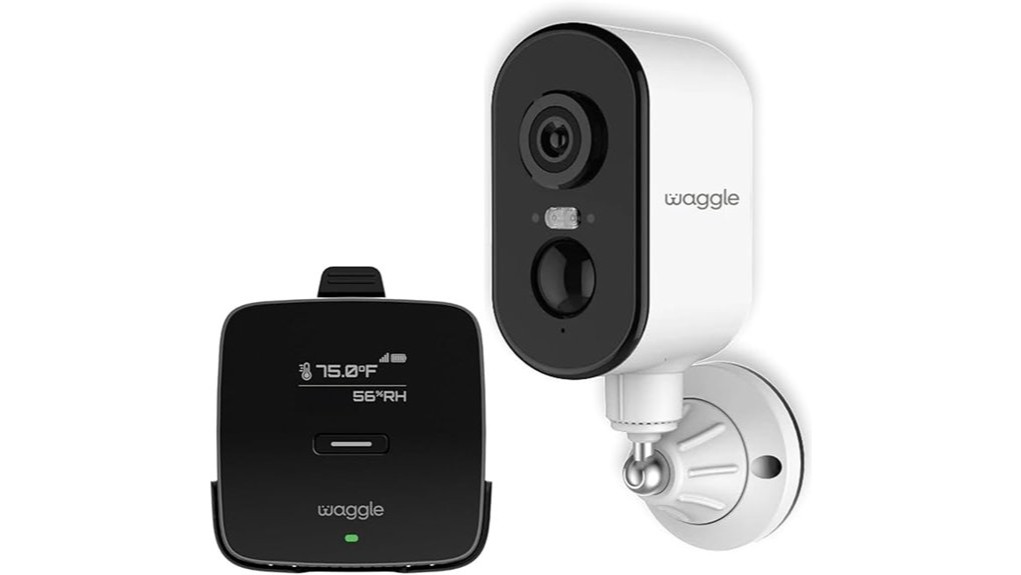

You’ll get a self‑contained 4G hub with temp/humidity and power sensors plus a 2K AI camera that streams, detects motion, and lets you talk back. Setup is straightforward: activate cellular in the app, test signal, place sensor where airflow’s representative, and confirm alerts to multiple contacts. Battery lasts ~4–6 days with mixed use and solar can help outdoors. It’s great for RVs, trailers, or pet sitters; keep going to see setup tips, performance notes, and buying tradeoffs.
Some Key Takeaways
- Portable 4G bundle combines temperature/humidity/power sensors and a 2K mini camera for off‑grid RV or pet monitoring without local Wi‑Fi.
- Real‑time cellular alerts and multi‑contact notifications reliably report environmental changes and power events, with occasional latency possible.
- 2K camera with AI motion detection, two‑way audio, and night vision produces clear, shareable footage while reducing false alerts via edge processing.
- Battery lasts ~4–6 days in mixed use; solar charging can extend uptime but depends on sunlight and alert frequency.
- Best for mobile, easy‑setup monitoring and caregiver sharing; consider ongoing cellular data costs and occasional sensor calibration.
How the Waggle RV/Pet Bundle Works (4G, Sensors, and Camera)
Because the Waggle RV/Pet bundle combines a 4G LTE hub, environmental sensors, and a 2K mini camera, it gives you continuous monitoring without relying on local Wi‑Fi. You get real-time temperature, humidity, and power-status alerts pushed over cellular, though occasional cellular latency can affect instant delivery. The camera streams 2K video with AI motion detection and two-way audio, while sensors report conditions that require occasional sensor calibration for accuracy. The system supports multiple emergency contacts and flexible storage, so you’ll feel included in a small network of caregivers. Overall, it’s practical, transparent, and suited for shared responsibility. It’s a good option for family pet owners who want an integrated monitoring solution that supports pet monitoring systems.
Real-World Setup and Connectivity: 4G Activation, Placement, and First-Day Checklist
When you power up your Waggle bundle for the first time, prioritize activating the 4G connection, verifying sensor placement, and confirming alerts so you’ll know the system is reliably reporting from day one. Begin by completing carrier activation in the app, then test signal strength and note network latency on uploads. Position the camera where antenna placement gets clear sky view; place sensors where airflow represents the monitored space. Run manual alerts to multiple contacts, check power-status notifications, and confirm video feed and two-way audio. Record initial readings and a photo for baseline. Adjust placement if readings or connectivity aren’t consistent. Also consider integrating with Delightful Pet Treat Cameras to add playtime features for your home pets.
Performance Deep Dive: Temperature/Humidity Alerts, Battery Life, and Solar Charging
Now that you've confirmed connectivity and baseline readings, evaluate how the system performs under real-use conditions: temperature/humidity alert behavior, battery longevity, and solar charging effectiveness. You’ll find alerts reliable when you set sensible alert thresholds; notifications arrive promptly via cellular and let you adjust thresholds to avoid churn. Battery life matches the 4–6 day claim in mixed use but expect gradual battery degradation over months, especially with frequent alerts and cold exposure. Solar charging helps maintain charge outdoors in good sun, cutting recharge cycles, though limited light reduces effectiveness. Overall, the system balances responsiveness and practical power management. This bundle is especially useful for monitoring pet health with smart home cameras and sensors like those sold for pet health monitoring in family households.
Camera and Security Test Results: 2K Video, AI Motion Detection, Two-Way Audio, and Night Vision
Although the camera’s 2K resolution doesn’t make you forget a dedicated security system, it delivers crisp, usable footage that lets you identify faces and license plates at moderate distances. You’ll appreciate AI detection that reduces false alerts by filtering motion types at the camera, using edge processing to keep most data local and responsive. Two-way audio is clear enough for quick check-ins or deterrence, and night vision reaches useful ranges. Consider legal compliance and privacy impact when enabling recordings or sharing clips; controls exist, but you’ll want to configure permissions and retention to match your comfort and local rules. Our store focuses on pet finder devices and related trackers for family pet owners, making this bundle a sensible option for keeping pets safe.
Who This Bundle Is Best For and Final Value Verdict (Costs, Alternatives, and Buying Tips)
If you need a portable, self-contained monitoring solution for an RV, trailer, or pet caretaking setup, this Waggle bundle delivers a strong mix of environmental sensors and a capable 4G camera without relying on Wi‑Fi. You’ll get reliable pet safety alerts, solid trip preparedness tools, and multi‑carrier cellular backup. It’s best for people who want easy setup, occasional off‑grid stays, or shared alert access among family or caregivers. Consider costs: initial bundle plus data plan; alternatives include Wi‑Fi‑based systems or separate solar power solutions. Buy if you value mobility and simplicity; otherwise compare long‑term data expenses. This bundle is especially useful for families focused on evacuation gear and emergency readiness when traveling with pets.
Some Questions Answered
Does the Bundle Support Multiple Simultaneous Camera Streams?
Yes — you can view multiple camera streams concurrently, though performance depends on cellular bandwidth management. You’ll be able to open more than one live feed, and the system prioritizes real-time alerts while balancing video quality. Expect adaptive resolution or frame-rate reductions when bandwidth is limited. You’ll appreciate the trade-offs: it keeps essential monitoring active for everyone who shares access, but heavy simultaneous streaming can strain connections.
Can I Integrate the System With Smart Home Platforms?
Yes — you can integrate it with smart home setups. You’ll find ecosystem integration options and basic voice control through popular platforms, and the device offers IFTTT compatibility for custom automations. You’ll judge its capabilities as practical rather than exhaustive: core sensors, camera triggers, and alerts play nicely with routines, but advanced native integrations may be limited. You’ll feel included using standard connectors to tie it into your existing smart home.
Is There a Mute/Privacy Mode for the Camera Microphone?
Yes — you can mute the camera mic. You’ll use the microphone toggle in the app to turn audio off for privacy, and the device shows a privacy indicator so you know when it’s muted. That gives you clear control without guessing. You’ll appreciate the straightforward toggle and visible indicator, which help the whole group feel respected and secure while still keeping monitoring and alerts active when you choose.
What Warranty and Customer Support Options Are Included?
You get a Limited warranty covering defects for a set period, and Phone support for setup and troubleshooting. You’ll feel supported: warranty terms are straightforward, though you should check coverage length and exclusions. Phone support hours may vary; response quality is generally solid. For peace of mind, register your device, document issues promptly, and keep receipts—this helps you and the support team resolve claims more smoothly and inclusively.
Are Motion-Triggered Clips Stored Locally or Encrypted in Cloud?
Motion-triggered clips can be stored locally on a TF card or sent as encrypted backups to the cloud, so you’re covered either way. You’ll keep immediate access with local storage for quick review, while encrypted backups protect footage offsite for shared peace of mind. This balance gives you control and community-minded security; weigh convenience versus redundancy to choose the setup that best suits your needs.