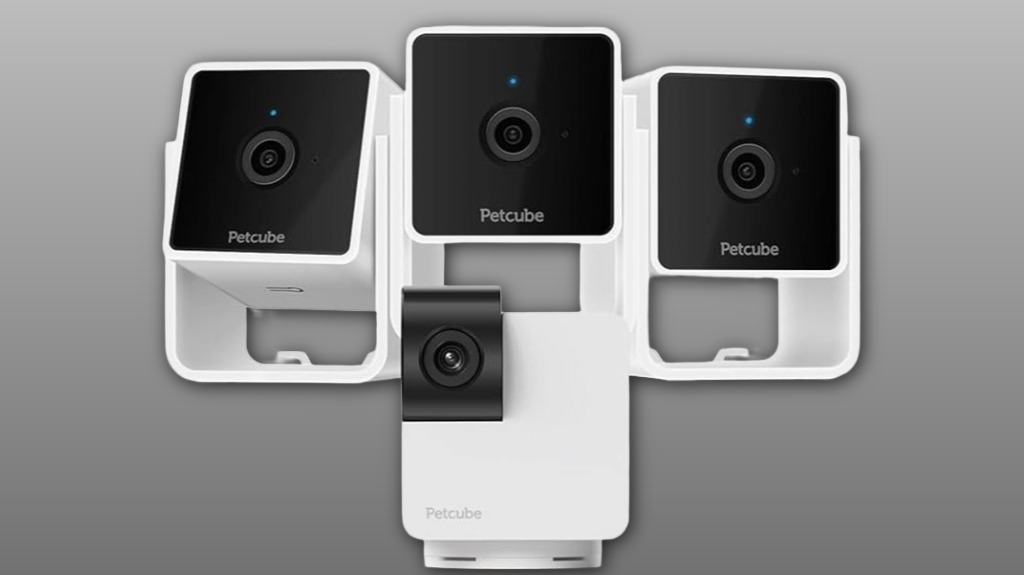
You’ll get two clear choices: the 3‑pack gives fixed 1080p coverage for simultaneous multiroom monitoring, while the Cam 360 offers a single steerable unit with pan‑tilt and 8x zoom for dynamic tracking. Daytime video and two‑way audio are reliable; night vision preserves motion but softens fine detail. AI alerts run on edge models and can false‑flag or miss events; subscriptions reduce noise at ongoing cost. Keep going to see detailed performance, setup, and value trade‑offs.
Some Key Takeaways
- Three fixed 1080p cams give reliable multiroom coverage; Cam 360 offers one flexible pan-tilt unit for single-room tracking.
- Video is clear in daylight; night vision preserves motion but loses fine detail.
- Two-way audio works well for commands and reassurance, with modest latency on typical 2.4 GHz networks.
- Cam 360’s on-device AI lowers latency but can produce false positives or miss complex events; subscriptions refine alerts.
- Consider power resilience, mounting to reduce blind spots, and long-term subscription and maintenance costs when choosing a bundle.
Which Bundle Fits You: Cam 3 Pack Vs Cam 360 at a Glance
Picking between the Cam 3 Pack and the Cam 360 comes down to coverage and flexibility: the 3 Pack gives you three fixed 1080p units for broad, stationary room coverage, while the Cam 360 provides a single pan-tilt camera with full 360° rotation for dynamic tracking of activity. You’ll choose based on room placement needs: deploy three units for simultaneous multiroom monitoring or a Cam 360 for a single versatile location. Consider battery backup requirements for power resilience; fixed units often need continuous power while the Cam 360’s mobility may benefit from temporary backup. Both integrate into shared household access. These cameras are ideal for keeping an eye on pets’ health and behavior with smart home monitoring to help family pet owners stay informed.
Video, Audio, and Night Vision: Real-World Performance Breakdown
Now that you've weighed coverage and placement, let's look at how the cameras actually perform when you're watching footage. You’ll get consistent 1080p streams with reliable color preservation in daylight and effective vivid night vision when light drops. In low light, detail softens but motion remains clear. Two-way audio delivers notable audio clarity for commands and reassurance; microphone and speaker preserve tone without harsh distortion. Pan-tilt rotation and 8x zoom keep subjects framed. Expect modest latency performance on typical 2.4 GHz home networks — live view and talkback stay usable, though instant responsiveness depends on Wi‑Fi quality. These features make it easier to monitor pets in vehicles using pet-friendly ramps for safe, stress-free loading and unloading.
AI Alerts, Detection Accuracy, and Subscription Trade-Offs
While the Cam 360’s AI delivers timely motion and sound alerts, you should treat its detections as probabilistic rather than infallible—false positives (mixing human, pet, and ambient noises) and occasional missed events can occur depending on scene complexity and audio levels. You’ll appreciate edge computing that processes data locally, reducing latency and preserving bandwidth, but on-device limits mean models simplify classifications. That trade-off reduces cloud dependence yet requires frequent model updates to improve accuracy. Expect fewer irrelevant pings with subscription-tuned alerts, but weigh costs against notification fatigue. In shared households, calibrate sensitivity so everyone’s needs feel respected and covered. Our store focuses on pet activity monitors and related products for family pet owners, which can help you keep pets active and tracked.
Setup, Privacy, and Day-to-Day Usability in a Multi-Camera Home
When you deploy multiple Cam 360 units across a home, plan placements and network topology up front to avoid interference and simplify management: assign descriptive names in the app, stagger power outlets to prevent bandwidth spikes on the same circuit, and keep each camera on your 2.4 GHz SSID since the device doesn’t support 5 GHz. You’ll complete quick setup, then optimize privacy by using camera-off mode and physical lens block via pan-tilt. In a multi camera layout, test routines integration for automations, evaluate battery options or constant power for uptime, and take advantage of mounting flexibility to include cameras in shared spaces confidently. Consider camera placement with pet behavior in mind to ensure coverage and minimize blind spots two-way pet camera.
Value Verdict: Cost, Use Cases, and Who Should Buy Which Bundle
Having sorted placement, naming, and privacy settings across multiple Cam 360 units, you can assess cost-effectiveness by matching bundle size to specific monitoring needs and household constraints. Choose the 3-pack if you cover separate rooms or multi pet households and want consolidated footage without subscribing immediately. Opt for single units when budget considerations or Wi‑Fi topology limit installations. Factor in long term maintenance—firmware updates, cleaning, and potential replacement—and confirm warranty coverage to avoid surprises. You’ll balance upfront price, optional Petcube Care subscription, and scale: buy for coverage density, not novelty, to get predictable, purposeful monitoring. For family pet owners, selecting the right system also means prioritizing pet monitoring basics to keep pets safe and owners informed.
Some Questions Answered
Does the Cam 360 Work Outdoors or in Unprotected Areas?
No, it’s not designed for outdoor or unprotected use — it lacks a weatherproof rating and shouldn’t be exposed to elements. You’ll want an enclosure or dedicated outdoor model for rain, dust, or temperature extremes. Indoors, expect reliable performance with low wireless latency on 2.4 GHz Wi‑Fi, clear video, and AI alerts. If you need outdoor coverage, choose a camera with an IP weatherproof rating to keep your group protected and connected.
Can I Integrate These Cameras With Alexa or Google Home?
Yes — you can integrate them with Alexa and Google Home. You’ll use voice commands to view live streams, arm/disarm alerts, and control camera-off mode; you can’t stream 5 GHz networks though. You’ll also include cameras in smart routines to trigger actions (lights, scenes) on motion or sound events. Setup is done via the Petcube app, then link the appropriate Alexa/Google Home skill for account-based control and routine creation.
Is Local (On-Device) Video Storage Supported?
No — you won’t get full local (on-device) video storage. The cameras don’t support continuous offline recording to internal drives; they rely on cloud services for saved clips. You can use limited local features like cached footage during outages, but long-term recording needs subscription-based encrypted storage. You’ll still feel secure: alerts and live view work locally, and transmitted clips use advanced encryption to protect your data.
How Many Simultaneous Live Streams Can the App Handle?
The app supports up to four simultaneous live streams. You’ll invite multiple viewers, but concurrent sessions are subject to bandwidth limits—each stream adds about 1–2 Mbps. You’ll maintain app stability if your uplink and router handle the combined throughput; otherwise video will degrade or disconnect. For reliable performance, guarantee strong 2.4 GHz WiFi, limit background traffic, and consider staggered viewing times to reduce concurrent session load.
Are Replacement Parts and Official Accessories Sold Separately?
Yes — you can buy replacement parts and official accessories separately. You’ll find replacement lenses and mounting brackets sold through the manufacturer’s store and authorized retailers. Ordering individual components lets you maintain consistent performance and aesthetics across devices. You’ll also get warranty-validated parts and support, so your setup stays secure and functional. Check compatibility notes and regional availability before purchasing to make certain a seamless fit with your existing units.